
Managed Desktop Services: The Complete Guide for Growing Businesses
-
 08 September 2026
-
 Cloud Desktop,Virtual Desktop
 -
 Written by
Editorial Team
Written by
Editorial Team
Managed desktop services means outsourcing the setup, security, monitoring, support, and upkeep of your company’s computers to a provider, for a flat monthly fee, instead of buying and running that expertise yourself. It covers everything between “the computer turns on” and “the computer is secure, patched, backed up, and someone answers the phone when it breaks,” bundled into one predictable line item rather than assembled piece by piece. For a growing business trying to decide whether that’s worth paying for, the honest answer usually comes down to one comparison: what one in-house IT hire actually costs versus what a managed provider charges to do the same job better.
What Are Managed Desktop Services, Exactly?
Every business computer needs the same basic things done to it, regularly, for as long as it’s in use. Someone has to set it up correctly the first time. Someone has to keep the operating system and software patched. Someone has to watch for security threats, back up the data, fix it when it breaks, and eventually replace or retire it. Managed desktop services means a provider handles all of that as a service, rather than your business hiring the people, buying the tools, and building the processes to do it internally.
The delivery model varies by provider. Some managed desktop services remotely manage the physical PCs already sitting in your office, patching and monitoring them over the network the same way a remote desktop connection would. Others deliver desktops as a fully hosted, virtual environment, where the desktop itself runs in a data center and streams to whatever device an employee is using. Both are legitimately “managed desktop services.” The difference is where the desktop physically lives, not whether it’s managed.
That distinction matters more than it sounds like it should. Remotely managing physical hardware still leaves your business owning the hardware itself, its refresh cycle, its physical security, and the risk of a lost or stolen device carrying company data on it. A hosted desktop solution removes that layer entirely: the device in an employee’s hands becomes close to interchangeable, since nothing sensitive is stored on it and the actual desktop environment lives on managed infrastructure regardless of which laptop happens to connect to it. Neither model is universally correct, a business with specialized local hardware, like design workstations with GPU peripherals, may need physical machines managed remotely rather than replaced with virtual ones, but it’s worth knowing which version of “managed” a given provider is actually offering before comparing quotes.
The Real Cost: One Hire vs. a Managed Team
This is the comparison that actually settles the decision for most small and mid-size businesses, and it’s worth doing with real numbers rather than a gut feeling.
A single fully loaded in-house IT generalist costs $80,000 to $125,000 per year once salary, benefits, payroll taxes, training, and tools are all counted, not just the salary line on an offer letter. That figure, per multiple 2026 market surveys, buys you exactly one person: one set of specialties, limited to business hours, unavailable on vacation or sick days, and rarely deep in every area a modern desktop environment actually touches, security, networking, cloud administration, and compliance among them.
Managed desktop services, by contrast, typically run $100 to $250 per user per month, or $50 to $150 per device per month depending on the pricing model. For a 20-person company, that lands in the $24,000 to $48,000 per year range, roughly a third to half the cost of one in-house hire, and it buys a full team’s worth of coverage rather than one person’s.
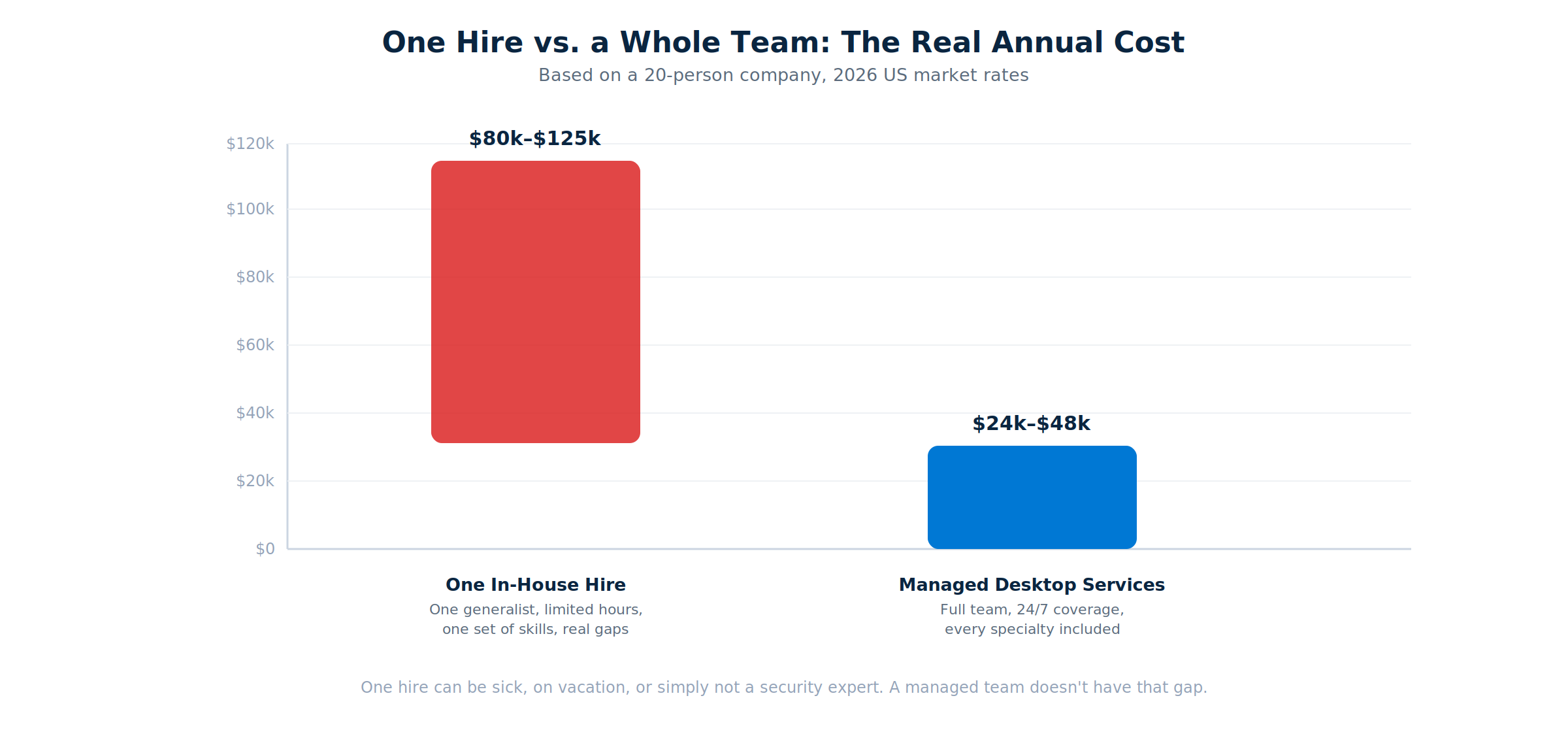
The honest caveat: this math shifts at scale. Businesses over roughly 100 employees, or with highly specialized needs, sometimes find a hybrid model, in-house staff handling day-to-day requests, managed services covering security and infrastructure, delivers the best value. But for the range most growing businesses actually sit in, under 100 employees, the comparison isn’t close.
Managed vs. Break-Fix vs. In-House: The Full Comparison
Cost is only part of the decision. The three common models also differ in how they handle risk, availability, and how predictable your IT budget actually is month to month.
| Factor | Break-Fix | Managed Desktop Services | In-House IT |
|---|---|---|---|
| Pricing model | $125–$350/hour, only when something breaks | $100–$250/user/month, flat and predictable | $80,000–$125,000/year salary, fixed regardless of workload |
| Approach | Reactive, fixes issues after they happen | Proactive, monitors and prevents issues | Depends entirely on the individual hired |
| Coverage hours | Business hours, by appointment | Typically 24/7 | Business hours only, with real gaps |
| Specialties covered | Whoever answers the call that day | Full team: security, networking, cloud, compliance | Whatever the one person hired happens to know |
| Best fit | Under 10 employees, simple setup, rare issues | 10 to 100 employees, growing or compliance-driven | 50+ employees, complex or highly specialized needs |
Break-fix looks cheapest when nothing is going wrong, which is exactly the problem. There’s no prevention built into the model, so the bill arrives at the worst possible time, alongside downtime, lost work, and whatever damage happened before anyone noticed. For a business with more than a handful of employees, or any real dependency on its technology working, that trade rarely pays off.
What’s Actually Included in a Managed Desktop Services Plan
-
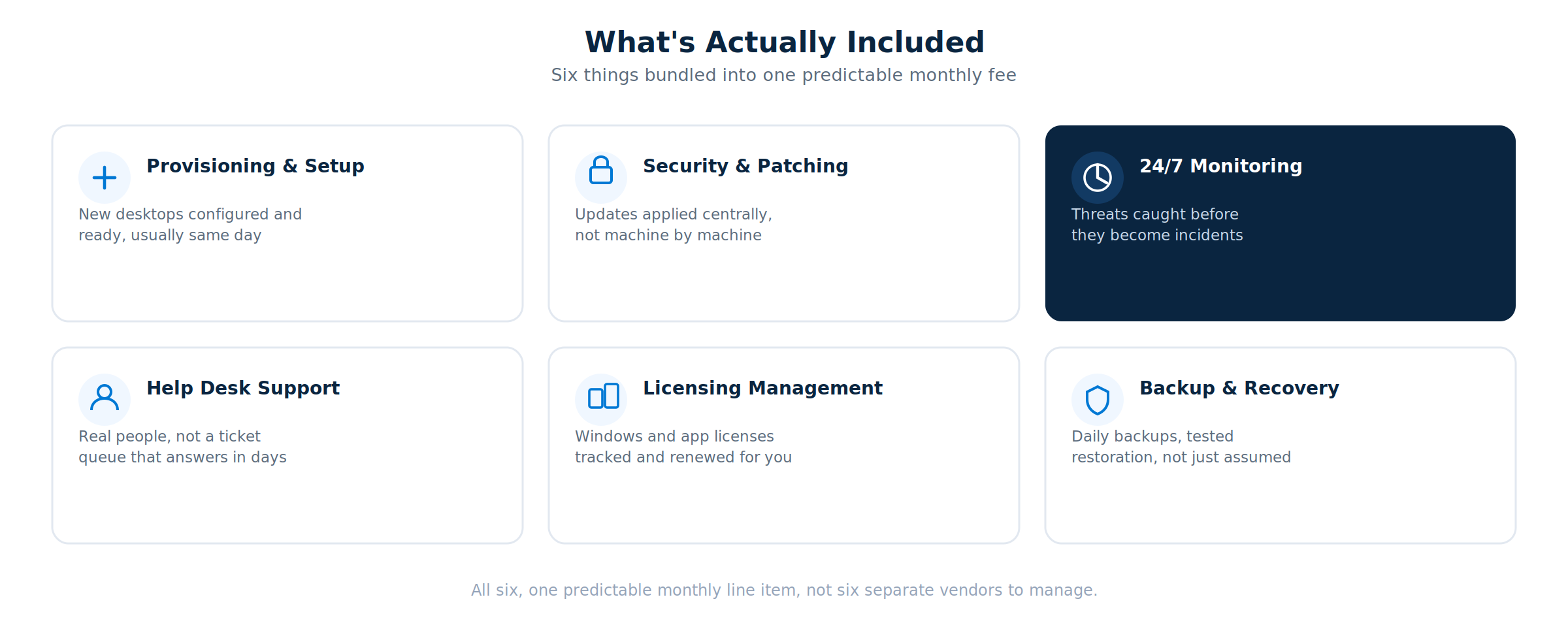
Provisioning and Setup
A new employee’s desktop should be ready before their first day, not something IT scrambles to configure the morning they start. Managed providers handle imaging, application installs, and account setup as a standard, repeatable process.
-
Security and Patch Management
Operating system and application updates get applied on a defined schedule across every managed device, centrally, rather than depending on individual employees remembering to click “update” or an internal team manually touching each machine.
-
24/7 Monitoring and Threat Detection
Problems get caught while they’re small, an unusual login pattern, a failing disk, a device that’s stopped checking in, rather than discovered after they’ve become an outage or a breach.
-
Help Desk Support
When something breaks, a real person picks up, by phone, chat, or email, rather than a ticket sitting in a queue for days. This is the single most-felt difference between a good managed provider and a bad one.
-
Licensing Management
Windows and application licenses get tracked, renewed, and reconciled against actual headcount, closing the gap where a business either overpays for unused licenses or drifts out of compliance without realizing it.
-
Backup and Recovery
Data gets backed up on a defined schedule, and, critically, that backup actually gets tested for restoration rather than assumed to work the one time it’s needed.
Signs Your Business Needs Managed Desktop Services
A few patterns show up consistently in businesses right before they make the switch, worth checking against your own situation honestly.
- IT issues are handled reactively, not proactively. If problems only get attention after something breaks, rather than being caught by monitoring beforehand, you’re paying the cost of downtime that proactive management would have prevented.
- One person is the entire IT department. When that person is out, sick, on vacation, or simply overwhelmed, everything waits. A single point of failure for a function this critical is a real business risk, not just an inconvenience.
- Security and compliance requirements have outgrown ad hoc management. Handling sensitive client data, meeting industry compliance standards, or simply facing more sophisticated threats than a generalist can keep up with on their own.
- The business is growing and onboarding is getting harder to keep up with. Every new hire needs a working, secure desktop on day one, and that gets harder to deliver consistently as headcount grows without a repeatable process behind it.
- You’ve had a downtime or security scare, even a small one. A near-miss is usually the moment a business realizes reactive support was a bet that eventually loses.
- Nobody can say with confidence what’s actually installed on every machine. If a device inventory doesn’t exist, or exists but is out of date, patching and security decisions are being made blind, and that gap tends to grow quietly until an audit or an incident forces the question.
- IT costs are unpredictable month to month. A budget that swings based on whatever broke that month makes planning difficult and usually means the underlying maintenance work isn’t happening consistently in the first place.
What This Looks Like at Different Company Sizes
-
10 to 50 employees is where managed desktop services show the clearest advantage. Businesses in this range typically spend $1,500 to $7,500 a month on a fully managed plan, well below the cost of even one in-house hire, while getting coverage that one person could never provide alone. This is also the range where break-fix stops making sense, once a business depends on more than a handful of machines working reliably, the lack of prevention becomes a real liability rather than an occasional inconvenience.
-
50 to 100 employees often still favors managed services, but this is where the conversation starts to include hybrid models, an internal point of contact handling routine requests and vendor coordination, with a managed provider covering security, monitoring, and specialized support behind them. Pure in-house staffing at this size usually means at least two or three hires to cover the same specialties a managed team already has.
-
100+ employees is where the math genuinely gets more situational. Larger organizations, or those with highly specific compliance or industry requirements, sometimes find a dedicated in-house team, or a substantial hybrid arrangement, delivers more value than a fully outsourced model. This isn’t a hard cutoff, some 200-person companies stay fully managed and some 40-person companies build an internal team, but it’s the range where a generic recommendation stops being useful and the specifics of your environment start to matter more than the general rule.
-
A concrete example: a 15-person accounting firm evaluating its options might find break-fix support costing roughly $150 to $250 per incident with no monthly floor, which sounds cheap until a ransomware incident or a failed server turns into a five-figure emergency bill with no prevention that could have caught it earlier. The same firm on a managed desktop plan at $150 per user per month pays roughly $2,250 monthly, or $27,000 annually, fixed and predictable, with monitoring in place specifically to catch the kind of incident that makes break-fix expensive in the first place. Hiring one in-house generalist instead would run $80,000 or more annually for a single person covering business hours only, more than double the managed cost, for less coverage.
Common Mistakes When Evaluating Managed Desktop Providers
-
Comparing quotes without confirming they cover the same scope. A per-user price from one provider and a per-device price from another aren’t directly comparable, and neither is meaningful without knowing exactly what’s included. Get the full scope in writing from every provider before comparing a single number.
-
Assuming cheaper always means worse, or that expensive always means better. Price correlates loosely with scope and quality, not perfectly. A provider charging more because of bundled security tools you don’t need isn’t a better deal than one charging less for exactly the coverage your business actually requires.
-
Not asking about response times until after signing. “24/7 support” can mean a five-minute response or a same-day callback. Ask for specific, contractual response-time commitments, not just a marketing claim, before you’re relying on them during an actual incident.
-
Ignoring the exit terms. A provider’s data portability and contract termination terms matter more before you sign than they seem to at the time. Understand exactly what happens if you need to leave, and how long that transition takes, while you still have leverage to negotiate it.
-
Treating the decision as permanent. The right model for a 15-person company isn’t necessarily right at 60 people. Revisit the comparison as your business changes size, rather than assuming whatever was decided at founding still fits years later.
Managed Desktop Services and Cyber Insurance
This is a driver behind a lot of managed desktop searches that doesn’t get discussed enough directly. Cyber insurance carriers have gotten significantly stricter about what they’ll underwrite, and the standard application questionnaire now routinely asks about things a business without dedicated IT expertise struggles to answer confidently: is multi-factor authentication enforced across all accounts, is patch management documented and on a defined schedule, is endpoint monitoring in place, are backups tested and encrypted.
A “no” or an uncertain answer to enough of these questions can mean a denied application, a significantly higher premium, or a policy that excludes coverage for the exact kind of incident, ransomware, a phishing-driven breach, most likely to actually happen. Managed desktop services address most of this list by default, not as an add-on purchased specifically for the insurance application, but because MFA, patch management, monitoring, and tested backups are standard parts of the service to begin with. For a business renewing a cyber policy or applying for one for the first time, walking in with those controls already documented is a materially different conversation than trying to explain why they don’t exist yet.
How to Choose a Managed Desktop Services Provider
Not all managed desktop providers are built the same way, and the differences matter more than the price on the quote.
-
Ask what’s actually included, not just the headline price. Two providers can quote the same per-user rate while one includes 24/7 monitoring and the other charges extra for it. Get the full scope in writing before comparing numbers.
-
Check who answers the phone. Real engineers who know your environment, or a shared call center reading from a script? This is the difference most businesses feel daily, long after the sales conversation is over.
-
Understand the delivery model. A provider managing your existing physical PCs remotely is solving a different problem than one delivering fully hosted virtual desktops. Neither is universally better, but they have different implications for hardware refresh cycles, remote work flexibility, and what happens when a device is lost or stolen.
-
Look for contract flexibility. Month-to-month terms let you leave if the service doesn’t hold up. A provider confident in their own service rarely needs to lock customers in for years to keep them.
-
Verify security credentials independently. A vague claim of “enterprise-grade security” is weaker than a specific, dated certification you can actually check, SOC 2 Type II being the most common independent validation to ask for.
Not sure if managed desktop services make sense for your headcount?
Tell us your team size and current setup, and we’ll walk through real numbers instead of a generic pitch, including whether a hybrid approach fits better than going fully managed.
Why Apps4Rent for Managed Desktop Services
Apps4Rent delivers managed desktop services through fully hosted virtual desktops, plans starting at $10 per user per month with provisioning, licensing, security patching, monitoring, and 24/7/365 support all included in one price. Rather than remotely patching hardware that still sits in your office, the desktop itself runs on SOC 2 Type II certified infrastructure, which means a lost laptop or an aging office PC stops being a security or refresh-cycle problem entirely, the device becomes close to irrelevant, since nothing of value lives on it.
Apps4Rent holds Microsoft Solutions Partner designations across Modern Work, Security, Infrastructure, and Data & AI, and has supported more than 10,000 businesses across 90+ countries over 18+ years. Plans are month to month with no long-term contract, and a 15-day risk-free trial lets you test the environment with your own applications before committing to anything. For businesses running specific industry software, real, tested experience hosting QuickBooks, Sage, Drake, UltraTax, and similar line-of-business applications comes standard, not bolted on as an afterthought.
If your team’s core need is broader than desktops specifically, standing up or managing servers, running specific applications, or a mix of both, our overview of Desktop as a Service covers how that model compares, and our guide to cloud servers for small business is worth a look if part of what you’re managing is backend infrastructure rather than end-user desktops.
Frequently Asked Questions
-
What is included in managed desktop services?
Typical inclusions are provisioning and setup, security patching, 24/7 monitoring, help desk support, licensing management, and backup and recovery, all bundled into one monthly fee. Exact scope varies by provider, which is why it’s worth getting the full inclusion list in writing before comparing prices.
-
How much do managed desktop services cost?
Typical pricing runs $100 to $250 per user per month, or $50 to $150 per device per month depending on the billing model. For a 20-person business, that generally lands between $24,000 and $48,000 per year, all-inclusive.
-
Is managed desktop services cheaper than hiring in-house IT?
For most businesses under 100 employees, yes, meaningfully. A single fully loaded in-house IT hire costs $80,000 to $125,000 per year and covers one person’s skill set with limited availability. Managed desktop services typically cost a third to half of that for a full team’s coverage.
-
What’s the difference between managed desktop services and a virtual desktop?
Managed desktop services is the broader category, outsourcing the management of business desktops. A virtual or hosted desktop is one specific delivery model within that category, where the desktop itself runs on remote infrastructure rather than a physical PC in the office. Both can be fully managed; they differ in where the desktop actually lives.
-
How quickly can a business switch to managed desktop services?
Straightforward setups can be live within days. More involved transitions, migrating existing applications, integrating with Active Directory, or moving data from an existing system, typically take one to two weeks depending on complexity.
-
Do managed desktop services work for remote and hybrid teams?
Yes, and this is often where the model shows its biggest advantage. Employees can access a managed desktop securely from any location or device, and IT can manage, patch, and secure that environment centrally regardless of where the actual person is working from.
-
Can managed desktop services support industry-specific software?
Most commercial and industry-specific applications can run within a managed desktop environment, though it’s worth confirming compatibility and licensing terms for specialized software, particularly accounting, legal, or design applications, before migrating.
-
What happens to data if we switch managed desktop providers?
Reputable providers document clear data portability terms and export processes as part of the service agreement. It’s worth confirming this in writing before signing with any provider, not discovering the answer only when you need to leave.
-
Does managed desktop services help with cyber insurance requirements?
Often, yes. Cyber insurance applications increasingly ask about multi-factor authentication, patch management, endpoint monitoring, and backup testing, controls that come standard with most managed desktop plans. Having these already documented and in place can make the underwriting process meaningfully easier than trying to implement them specifically to answer a questionnaire.
-
Can a small business with fewer than 10 employees use managed desktop services?
Yes, though break-fix support is sometimes the more cost-effective choice at that scale if the setup is simple and issues are rare. The calculation usually shifts toward managed services once a business depends on more than a handful of machines working reliably, or handles any sensitive client data.
The decision underneath all of this is simpler than it looks once the real numbers are on the table. One in-house hire costs more than a managed team and still leaves real gaps, coverage, specialties, and availability, that a managed provider is built to close. The question worth asking isn’t whether managed desktop services are worth the cost. It’s whether your business can still afford to do this piecemeal.