Hosted Exchange Hosting: Managed, Cloud & Dedicated Plans

Apps4Rent hosts and manages Microsoft Exchange so your team gets enterprise email, calendaring, and contacts without running the server yourself. Choose shared hosted Exchange, fully managed Exchange, or a dedicated single-tenant server on Azure, all backed by free, zero-downtime migration. Plans start at $6.45/mailbox/month with unlimited mailbox space, and every tier includes 24/7 support and setup handled by Microsoft-certified engineers.

We've supported businesses on hosted Exchange since 2003, completed over 10,000 email migrations for different platforms, and provided Exchange and Office 365 migration support for teams moving in either direction, all with no data loss.

  • Price Plans from $6.45/Month
  • Top Hosted Exchange Provider Since 2003
  • All Currently Supported Exchange Server Versions
  • 24/7 Support via Phone, Chat, and Email
Pricing Plans

Get Everything You Need


Fully managed
service

Apps4Rent fully manages Exchange for you, whether it runs on-premises or in the cloud. We handle setup, monitoring, patching, and support, so your team isn't the one on call when something needs attention.

All Exchange versions supported

We support all currently available Exchange releases, and our hosting costs significantly less than running an Exchange server in-house once you account for hardware, licensing, and IT staff time.

Wide variety
of hosting options

We migrate mailboxes to and from any platform, and you can pair hosted Exchange with a cloud-based virtual desktop environment or run Dedicated Exchange on Azure for a setup that scales with you.


Safe, Secure, Reliable


Secure in top-tier
data centers

Host Exchange with us and be rest assured of the data security. Your data is stored in top tier U.S.-based data centers with excellent Disaster Recovery capabilities.

Zero data loss
and downtime

Continue working normally as your mailboxes are not affected at all. There will be no downtime or data losses while migration is in progress.

Over 10,000
migrations

Our experts have successfully performed over tens of thousands of migrations since a decade. Get the best expertise available for Hosted Exchange services!


Pay Less...Get More


Free migration
to Office 365

Get free migration assistance on all Exchange and Office 365 plans. If you purchase our annual subscription, we migrate all your mailboxes free of cost.

Best pricing
in the industry

Apps4Rent offers unlimited mailboxes, free ActiveSync, 24/7 support at best prices. With Apps4Rent, you get the best ROI out of every dollar spent on our Exchange services.

24/7 end-user
real support

Apps4Rent offers free 24/7 support to the end users, while Microsoft serves only the primary contact. Unlike Microsoft, we are instantly available via phone, chat, or email.


Serving Over 10,000 Businesses in More Than 90 Countries

What Is Hosted Exchange Hosting?

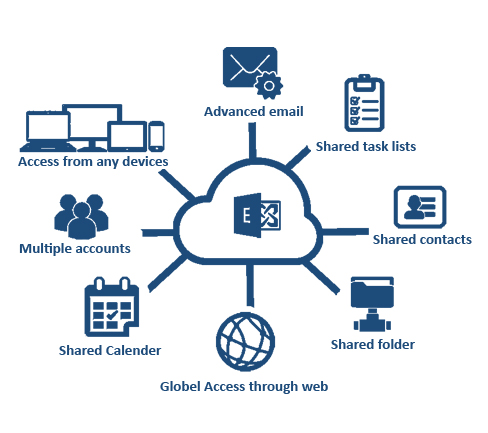
Hosted Exchange hosting is a service where a provider like Apps4Rent runs Microsoft Exchange Server on your behalf, on infrastructure it owns and manages, so you get business email, shared calendars, and contacts without buying hardware, installing software, or handling server maintenance yourself. It differs from Microsoft 365 in that Exchange runs on Apps4Rent-managed servers rather than directly through a Microsoft tenant, which gives you more control over configuration and, if needed, a fully dedicated server rather than shared infrastructure.

Apps4Rent offers three ways to run hosted Exchange, depending on how much control you want:

Shared hosted Exchange: unlimited mailbox space on multi-tenant infrastructure, starting at $6.45/mailbox/month.

Managed Exchange hosting: Apps4Rent's team handles setup, monitoring, and maintenance on your existing or new Exchange environment, on-premises or in the cloud.

Dedicated Exchange hosting: a private, single-tenant server on Azure for organizations that need full control over the environment, starting at $450/month.

Hosted Exchange hosting environment on Apps4Rent

How Much Does Hosted Exchange Hosting Cost?

Hosted Exchange plans start at $6.45/mailbox/month for 15 or more users on an annual plan (or $7.95/mailbox/month for fewer than 15 users), with unlimited mailbox space and hardware and software licensing included. Hosted Exchange Plus runs $9.95/mailbox/month and adds free Outlook download and free email archiving. Organizations that need a fully private server can choose Dedicated Exchange on Azure starting at $450/month. Compare the four plans below, or see a full side-by-side breakdown of every tier.

Hosted Exchange
 

$6.45/month

15 Users Minimum, Annual Payment. $7.95/Mailbox/Month for <15 Users.

  • Unlimited mailbox space
  • Software/Hardware
    licenses included
  • Outlook download @ $1/mailbox
  • Email archiving @ $3/mailbox
  • Option to add MFA

Hosted Exchange Plus
 

$9.95/month

15 Users Minimum, Annual Payment. $10.95/Mailbox/Month for <15 Users.

    • Unlimited mailbox space
    • Software/Hardware
      licenses included
    • Free Outlook download
    • Free email archiving
    • Option to add MFA

Microsoft 365 Business Basic (no Teams)

$5.40/month
Based on Annual Commitment.
 
  • 50 GB Mailbox
  • Office 365 Exchange,
    Teams, SharePoint, OneDrive
  • Web-based Outlook, Word, etc.
  • Free email archiving
  • 1 TB file storage and sharing

Dedicated Exchange
 

$450/month

 
  • Full control over the environment
  • 8 GB RAM, 4 vCPU,
    500 GB Disk Space
  • 1 Server
  • Ideal for upto 20 users
  • Daily Backups

Migrate to Exchange from Different Platforms

Apps4Rent has successfully completed over tens of thousands of migration from different email platforms such as Exchange, POP3/IMAP, G Suite, Yahoo Mail, SharePoint, Lotus Notes, Kerio, Mozilla Thunderbird, AWS Workmail, Groupwise, Zimbra, and more.

Submit your requirements and chat with us.

Exchange Online
GoDaddy to Hosted Exchange migration
Gmail to Hosted Exchange migration
SharePoint to Hosted Exchange migration
Rackspace to Hosted Exchange migration
Bluehost to Hosted Exchange migration
Yahoo to Hosted Exchange migration
Kerio to Hosted Exchange migration
IBM Lotus Notes to Hosted Exchange migration
Groupwise to Hosted Exchange migration
Zimbra to Hosted Exchange migration
AWS to Hosted Exchange migration
Enterprise Vault to Hosted Exchange migration
Intermedia to Hosted Exchange migration
Aol to Hosted Exchange migration
Liquid Web to Hosted Exchange migration
FastMail to Hosted Exchange migration
cPanel to Hosted Exchange migration
SmarterMail to Hosted Exchange migration
Proton mail to Hosted Exchange migration
Mozilla Thunderbird to Hosted Exchange migration
iCloud to Hosted Exchange migration
MDaemon to Hosted Exchange migration
ZOHO to Hosted Exchange migration
Mail.com to Hosted Exchange migration
Lycos to Hosted Exchange migration
Tutanota to Hosted Exchange migration
Hushmail  to to Hosted Exchange migration
GMX to Hosted Exchange migration
1&1 to Hosted Exchange migration

Microsoft Exchange Migration Process

STEP 1: PRE MIGRATION

  • Introduction to the onboarding team
  • Planning the feasibility of migration
  • Dedicated migration expert for each case
  • Customized migration strategy
  • Setting the migration date

Image explaining Microsoft Exchange migration process

STEP 2: MIGRATION

  • Account synchronization
  • Test migrations of representative users
  • Regular updates on the migration process
  • Working with local admin team to check configurations

STEP 3: POST MIGRATION

  • Post migration checks of mailboxes, files, Active Directories
  • Troubleshooting minor issues that may occur
  • Training tips to the users on how to sign up in the new environment
  • 24/7 dedicated Support via phone, chat, and email

Why Choose Apps4Rent for Microsoft Exchange Hosting Services?

There are many cloud providers that offer Microsoft Exchange hosting services, but only a few can claim our following achievements:

Image explaining why to choose App4Rent for Hosted Exchange services?
  • We have served over 10,000 businesses - from small and medium businesses to Fortune 500 companies, including regulated industries such as legal practices that need to control how their data is stored and accessed.
  • We have over 18 years of experience in Cloud hosting business, including business applications such as Exchange, SharePoint, QuickBooks, Office 365, and cloud infrastructure such as Virtual Desktop, servers, and private cloud.
  • Apps4Rent is a Microsoft Solutions Partner with specializations in Modern Work, Security, Data & AI (Azure), Digital & App Innovation (Azure), and Infrastructure (Azure).
  • We are a Tier-1 Microsoft Cloud Solution Provider for Office 365 and Azure.
  • Apps4Rent is one of the few Microsoft-endorsed Government Cloud Partners providing Microsoft 365 GCC licenses and services to government organizations and their subsidiaries. We have successfully worked with county, state, and federal government agencies and understand the unique requirements of public-sector organizations. If you have a government project, our certified team is ready to help.
  • We provide superb 24/7 support by phone, chat, and email, which is more extensive than Microsoft's Support.

Managed, Cloud, or Dedicated Exchange Hosting: Which Fits Your Business?

All three options run on Apps4Rent infrastructure with the same 24/7 support and free migration. The difference is how much control and isolation you need.

Managed Exchange Hosting

Best if you already have an Exchange environment, on-premises or in the cloud, and want Apps4Rent to take over day-to-day administration: monitoring, patching, backups, and troubleshooting, without moving to new infrastructure.

Cloud (Shared) Exchange Hosting

Best for most small and mid-sized teams. You get unlimited mailbox space on Apps4Rent's multi-tenant cloud infrastructure, starting at $6.45/mailbox/month, with hardware and software licensing already included.

Dedicated Exchange Hosting

Best for organizations with compliance, performance, or customization needs that call for a private, single-tenant server. Runs on Azure with full control over the environment, starting at $450/month.

Hosted Exchange Features by Apps4Rent

  • Secure and Reliable

    • 99.9% Uptime Guarantee
    • Daily Data Backups
    • Disaster Recovery Capabilities
    • SOC 2 Type II Data Centers
    • Free Anti-Spam/Anti-Virus
    • Microsoft Certified Expertise
  • Leading Exchange Provider

    • Compliance and certifications of Apps4Rent Free Migration Assistance
    • Compliance and certifications of Apps4Rent Over 10,000 + Migration
    • Dedicated Manager for Each Case
    • Tier 1 Microsoft Partner
    • 18+ Years of Hosting Experience
    • Presence in 90+ Countries

Case Studies

Case study image of Migration from On-Premise infrastructure to Office 365

Migration from On-Premise infrastructure to Office 365

How a Financials Company Eliminated On-Premise Infra with Office 365 migration

Read More ⇨

Case study image of Migration from Exchange 2010 to Office 365

Migration from Exchange 2010 to Office 365

How a Cargo Company Saved Huge Infrastructure Costs by Migrating to Office 365

Read More ⇨

Case study image of Migration from Rackspace to
Office 365

Migration from Rackspace to
Office 365

How an Equipment Manufacturer Optimized IT Budget With Office 365

Read More ⇨

Case study image of Migration from
Google Suite to Office 365

Migration from
Google Suite to
Office 365

How an Automation Company Successfully Migrated 200 IMAP Mailboxes to Office 365

Read More ⇨

Frequently Asked Questions (FAQs):

  1. What is hosted Exchange hosting?

    Hosted Exchange hosting is a service where Apps4Rent runs and manages Microsoft Exchange Server on your behalf, so you get business email, calendaring, and contacts without owning or maintaining the physical server. We offer shared hosted Exchange, fully managed Exchange for your existing environment, and dedicated single-tenant servers on Azure.

  2. How much does hosted Exchange hosting cost?

    Plans start at $6.45/mailbox/month for 15 or more users on an annual plan, or $7.95/mailbox/month for fewer than 15 users, with unlimited mailbox space included. Hosted Exchange Plus is $9.95/mailbox/month and adds free Outlook download and archiving. Dedicated Exchange on Azure starts at $450/month for a fully private server.

  3. What's the difference between managed Exchange hosting and cloud Exchange hosting?

    Managed Exchange hosting means Apps4Rent administers an Exchange environment you already have, on-premises or in the cloud, handling monitoring, patching, and support. Cloud (shared) Exchange hosting means your mailboxes run on Apps4Rent's own multi-tenant infrastructure from day one. Both include 24/7 support; the difference is whether you're keeping your existing setup or moving to ours.

  4. Can I get a dedicated Exchange server instead of shared hosting?

    Yes. Dedicated Exchange runs on Azure with full control over the environment, 8 GB RAM, 4 vCPUs, and 500 GB of disk space on a single server, ideal for up to 20 users, with daily backups included. See full specifications and pricing for a private server.

  5. What Exchange versions and migration sources does Apps4Rent support?

    We support all currently available Exchange releases, on our cloud or on Azure, and we provide managed services for existing on-premises Exchange deployments. We've completed migrations from Exchange, POP3/IMAP, G Suite, Yahoo Mail, SharePoint, Lotus Notes, Kerio, Thunderbird, AWS WorkMail, GroupWise, Zimbra, and other platforms. For hosting on older, legacy Exchange releases, contact our sales team to confirm support.

  6. Will my admins or users have to do anything during migration?

    Very little. Apps4Rent handles the bulk of the migration work. Your admins only carry out small tasks, fully guided and supervised by your dedicated migration expert, and migrations happen with zero data loss and no downtime.

  7. What happens if I run into problems after migration?

    Your migration isn't considered complete until you say it is. Your dedicated migration expert stays in touch to resolve any post-migration issues, and you always have access to 24/7 support by phone, chat, and email.
  8. What is email archiving, and is it included?

    Email archiving automatically retains mail based on policy or business requirements and stores older content in an in-place, searchable archive, helping you stay compliant. It's an out-of-the-box Microsoft feature available on our advanced Exchange plans as an organization-level add-on. Contact our sales team for details.

  9. Is my data safe and compliant with Apps4Rent?

    Yes. We use secure firewalls to protect your data and follow GDPR policy. If your organization needs stricter security, you can back up your data on Azure Backups. Organizations that must meet defense or federal compliance requirements such as CMMC can also move into a U.S. sovereign Microsoft 365 GCC environment, handled separately from standard hosted Exchange.

  10. Can I access hosted Exchange from any device?

    Yes. Apps4Rent's Hosted Exchange is cloud-based, so it's accessible from anywhere, on PCs, MacBooks, iOS and Android devices, Chromebooks, tablets, and remote browsers.

  11. How do I get started with Apps4Rent's hosted Exchange services?

    Click "Submit Inquiry" above and you'll see the next steps. Contact our support desk anytime if you have questions. Thank you for considering Apps4Rent.

Greg, IT Executive Manager, Palo Alto, California

"We were happy hosting Exchange and SharePoint with Apps4Rent for 10 years. When we upgrdaded to Exchange 2019, it was so simple with Apps4Rent. It happened without a hitch over a weekend."

Janice, Sr. Support Engineer, Queens, New York

"When we dismantled our on-premise email servers, we moved 120 mailboxes to the cloud without any disruptions. We didn't even know how fast and efficiently Apps4Rent did the job. Full marks to the team"

Recent Feedback

  • "Great service in helping me get Outlook 2016 connected to the Hosted Exchange 2013 server - thank you!"
    Mickey - Manager, IT Firm, Alabama
  • "Migrated our 75 mailboxes in no time. Excellent services by Apps4Rent for hosted Exchange."
    Wang - IT Admin, Tech Setup in Holmdel, New Jersey
  • "Emma provided me with needed instructions for Exchange 2019 setup on various Apple devices."
    Ashley - Support Engineer, Colorado Springs, Colorado
  • "Cathy immediately figured out what the problem was and had a solution already in place before I knew it."
    Richard Lea - Founder, Speech Therapy Company, Scottsdale, Arizona
  • "Fast response, exact points service, understood what is needed with excellent response."
    Hamza - Attorney, Law Firm in Norfolk, Virginia
  • "Very helpful and fast. David is an awesome supporter and knows his stuff. Always ready to help and a true professional."
    Felix - Interior Designer, Minneapolis, Minnesota, Ramsey Engler Ltd.
  • "All the questions were asked, person was professional and very informative."
    Hrvoje - Chief Executive, Fencing and Railing Company in Youngwood, Pennsylvania
  • "Great technical support - professional attitude and service"
    H.J.M. Lemmen - Supplier, Manufacturing Company in Stateline, Nevada
  • "Excellent and knowledgeable service as always - just what I've come to expect form Apps4rent!"
    Conrad - CPA in Allen, Texas

Submit Inquiry

Compliance and certifications of Apps4Rent