Best Microsoft Project Online Alternatives
-
 06 March 2026
-
 Project Server
 -
 Written by
Editorial Team
Written by
Editorial Team
For many organizations, Microsoft Project Online has long been the central hub for managing complex portfolios and tracking project timelines. This cloud-based solution provided a familiar way to coordinate resources, manage schedules, and maintain a high-level view of all enterprise projects. With the Project Online EOL approaching, its retirement marks a significant change for project management offices everywhere.
Microsoft has officially announced that Project Online will be shut down on September 30, 2026. The Project Online end-of-life timeline leaves businesses relying on this platform must now chart a new course for their project management infrastructure. While the cloud-based Project Online is being retired, its underlying technology is not disappearing. Microsoft will continue to offer the Project Server Subscription Edition and the standalone Project Desktop application, signaling a strategic shift in their product focus.
This transition period presents a critical decision point. The search for viable Microsoft Project Online Alternatives begins now, requiring a solution that preserves existing workflows while offering a secure and scalable future. For teams dedicated to the Microsoft ecosystem, one path stands out as a natural and powerful successor: migrating to a Hosted Project Server environment. This approach maintains the robust functionality you depend on while moving your operations into a modern, flexible cloud framework.
Why Apps4Rent’s Hosted Project Server is the Leading Project Online Alternative
With the upcoming retirement of Project Online, many organizations are evaluating their next steps. The Project Online end-of-life announcement has accelerated the search for solutions that feel like an evolution, not a disruption. The goal is to find a solution that feels like an evolution, not a disruption. A Cloud Hosted Project Server stands out as the most logical and powerful choice for businesses committed to the Microsoft project management ecosystem.
This approach involves running Microsoft Project Server on enterprise-grade cloud infrastructure managed by Apps4Rent. It delivers a familiar, fully-featured experience without the overhead of maintaining physical hardware. Your team continues using the same powerful tools and interfaces they know, ensuring a smooth transition that protects your existing processes and valuable project data.
The advantages of this Hosted Microsoft Project Server model are substantial:
- You gain a truly seamless migration path. Expert providers, such as ourselves, manage the entire transition with precision, moving your projects and settings without any workflow interruption or data loss. This careful handling means your project timelines and team productivity remain entirely unaffected.
- The solution supports all current Project Server versions, including 2019 and 2016, whether you need a dedicated or hosted setup. These are deployed on secure platforms like Azure and come with integrated SharePoint Enterprise features, preserving the collaborative environment your organization depends on.
- Beyond the initial setup, you receive continuous operational benefits. This includes proactive monitoring to ensure maximum uptime, 24/7 support for your end-users, and the robust security of top-tier U.S. data centers. This comprehensive management model provides a compliant, enterprise-ready environment so your IT team can focus on strategic goals instead of server maintenance.
For those seeking a direct and reliable Microsoft Project Online Alternative, a professionally Hosted Project Server offers a clear and compelling path forward.
Evaluating Other Microsoft Project Online Alternatives
Microsoft offers several other tools within its ecosystem that organizations might consider. While these solutions serve specific purposes well, they each have a distinct scope that differs significantly from a comprehensive platform like Project Online.
For task management, Microsoft provides Planner. The Basic version is excellent for simple, visual Kanban boards and lightweight team coordination. Its Premium tier incorporates more advanced scheduling logic from the Microsoft Project engine, offering a step up in complexity. Another option, Microsoft Loop, facilitates wiki-style collaboration and can connect tasks with Planner and To Do lists, promoting teamwork within the Microsoft 365 environment.
For more specialized needs, Azure DevOps delivers powerful capabilities for software development teams following agile methodologies. On the other end of the spectrum, Dynamics 365 Project Operations is designed for large professional service organizations, integrating project management with financial and operational data.
However, these tools often fall short as complete replacements for Project Online. They typically lack the deep, enterprise-grade portfolio management and sophisticated resource management capabilities that larger projects demand. Their integration with a full project lifecycle is also more limited. This is where a cloud hosted Project Server solution demonstrates its value. It preserves the powerful, centralized control and extensive functionality that complex project portfolios require.
The Compelling Advantages for Apps4Rent’s Hosted Project Server
Migrating from Project Online requires a solution that not only matches its capabilities but enhances them. The Apps4Rent Project Server hosting solution is designed to do exactly that, providing a powerful and managed environment for your most critical projects.
This approach delivers the robust, centralized portfolio management you rely on. You maintain access to advanced resource pools, custom workflows, and integrated Power BI reporting. The key difference is we eliminate the burden and cost of maintaining on-premises hardware. Your team gains all the functionality without any of the infrastructure headaches.
The operational benefits of Hosted Microsoft Project Server are significant:
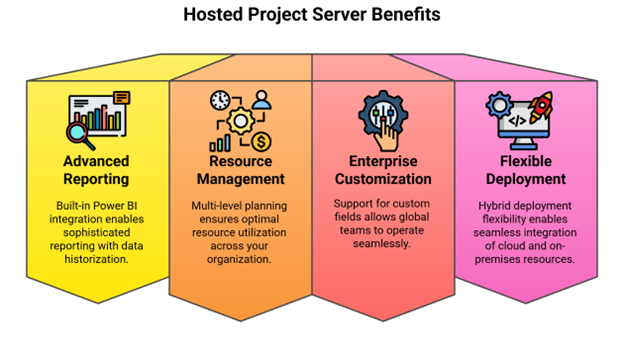
- Advanced Reporting and Analytics: Built-in Power BI integration provides sophisticated reporting with data historization and secured permissions, giving you deeper insights into project performance while maintaining strict data security.
- Comprehensive Resource Management: Multi-level resource planning by skills, department, and location with automated allocation and Visio workflows ensures optimal resource utilization across your organization.
- Enterprise-Grade Customization: Support for enterprise custom fields, shared resource pools, and cross-company collaboration enables global teams to work seamlessly within a unified system.
- Flexible Deployment Options: We offer hybrid deployment flexibility, allowing you to integrate cloud and on-premises resources seamlessly while maintaining real-time collaboration across your organization.
We stand behind this solution with a proven track record. Apps4Rent has successfully completed over 10,000 migrations, and we include a free migration service to ensure your transition is smooth and without risk. For a Hosted Project Server that combines enterprise power with operational simplicity, our offering represents a strategic step forward from other Microsoft Project Online Alternatives.
Understanding the Limitations of Other Microsoft Project Online Alternatives
When evaluating different Microsoft Project Online Alternatives, it’s important to recognize where other solutions fall short for complex project management needs. While tools like Planner and Azure DevOps serve their purposes well, they lack the comprehensive features required for enterprise-level project portfolio management.
Here are the key limitations of alternative tools compared to a Hosted Project Server:
- Microsoft’s lighter tools, including Planner and Loop, cannot handle sophisticated requirements like cross-project resource planning or portfolio prioritization. Their integration with SharePoint is often limited compared to the deep, native connection offered by a Hosted Microsoft Project Server.
- Azure DevOps focuses primarily on software development workflows, leaving gaps for general business project management. It doesn’t provide the same level of enterprise resource management or the advanced reporting capabilities that professional project offices require.
- Third-party platforms like Jira or Asana introduce different challenges. While they might offer specific niche features, they typically create data silos that complicate organization-wide reporting. They also lack seamless Active Directory integration and may present security compliance complexities within a Microsoft-centric environment.
Unlike these alternatives, a Cloud Hosted Project Server delivers proven Project Portfolio Management (PPM) capabilities. It maintains full Active Directory integration, supports automation through PowerShell, and enables established governance workflows that ensure project consistency and compliance across the organization.
| Tool | Best For | Limitations Compared to Hosted Project Server |
| Hosted Project Server | Enterprise PPM, resource & portfolio management | Full-featured, fully managed cloud service |
| Planner Basic/Premium | Simple task and scheduling needs | No cross-project portfolio oversight |
| Azure DevOps | Agile software development | Lacks enterprise portfolio governance |
| Jira | Software project hierarchies and Kanban | Data silos, limited Microsoft integration |
Your Project Management Future with Apps4Rent
The Project Online EOL deadline marks a significant turning point for organizations relying on Microsoft’s project management ecosystem. While this change requires action, it also presents a valuable opportunity to transition to a more powerful and flexible solution.
As we’ve explored, a Hosted Project Server stands out as the most capable and seamless path forward among all Microsoft Project Online Alternatives. As a Microsoft Solutions Partner, Apps4Rent is uniquely positioned to guide your transition. Our Hosted Microsoft Project Server solution delivers enterprise-grade performance with the operational simplicity of a fully managed service. We bring proven migration expertise, having successfully moved thousands of clients to cloud-hosted environments while maintaining business continuity.
The path forward is clear. Rather than compromising with limited alternatives, you can advance to a superior project management platform that grows with your organization. With Apps4Rent’s Cloud Hosted Project Server, you’re not just replacing Project Online, you’re upgrading to a more powerful, secure, and scalable solution for the future of your project management.
Frequently Asked Questions
-
When is Project Online being deprecated?
Project Online end-of-life is set for September 30, 2026. The announcement was made due to architectural limitations preventing future innovation.
-
What should I do when Project Online reaches end-of-life?
With Project Online EOL on September 30, 2026, migrate to Apps4Rent’s Hosted Project Server for seamless continuity. It preserves all your workflows, supports Project Server 2019/2016 on Azure with SharePoint integration, and includes free migration service with zero downtime—plus 24/7 support and enterprise-grade security.
-
What happens to our Project Sites data?
Your project data including risks and documents can be migrated using Microsoft’s tools or through specialized services from providers like Apps4Rent.
-
Is Microsoft Planner a sufficient replacement?
Planner works for basic project needs but lacks enterprise features. For advanced requirements, a Hosted Project Server provides greater capability.
-
Can we still use Microsoft Project Desktop?
Yes, the Project Desktop application remains fully supported.
-
What are our best migration options?
Among Microsoft Project Online alternatives, a professionally managed Hosted Project Server from Apps4Rent offers the smoothest transition with maintained functionality.